

Every band has two audiences. There are the people who follow you, a number on a screen that goes up when a song lands and down when the algorithm moves on. And there are your fans. The ones who know the deep cuts, who drove four hours to stand at the barricade, who bought the shirt from the van. Most of the internet cannot tell the two apart. Your streaming dashboard cannot, your social feed cannot, and the fan in the front row looks exactly like everyone else in your follower count.
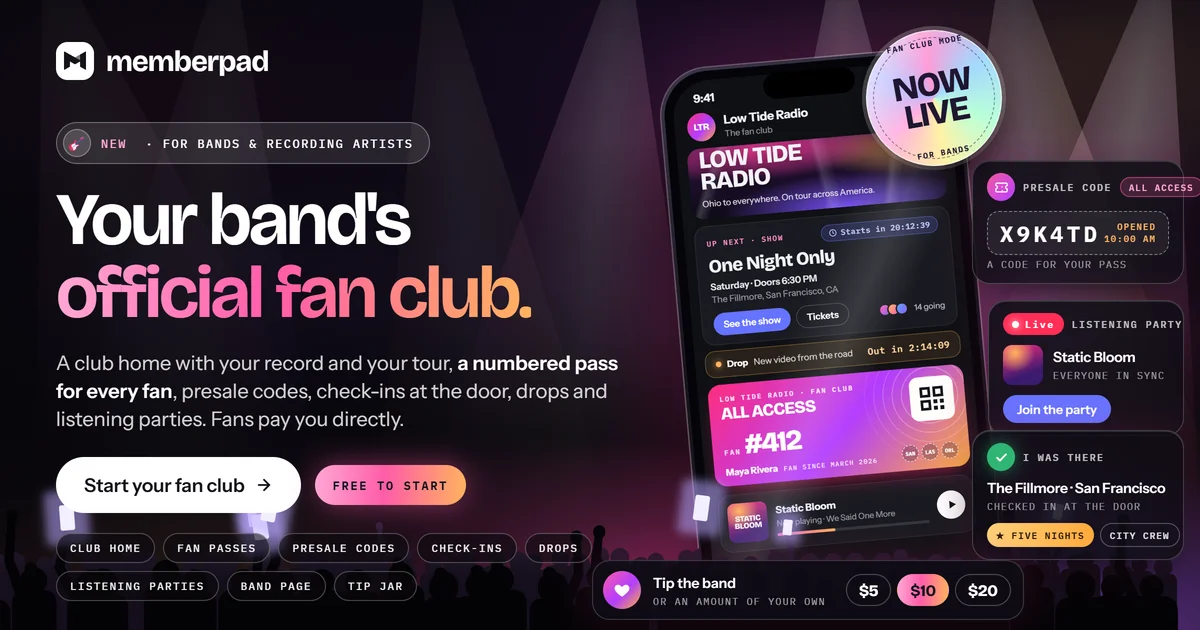
Starting today, MemberPad can. Fan club mode turns a community into an official fan club for your band: passes instead of tiers, fans instead of members, a home built around your record and your tour, and a numbered card in every fan's pocket.
This post walks through what is inside it, how a show night works from the presale to the photos the morning after, and how to set your own club up in one run.
Who it is for
Fan club mode is for bands and recording artists. Your community needs to be in the Music category, with "Yes, it's for a band" chosen as the answer to "Is this community being built for a band?" You will see the question when you create a Music community, and you can answer it any time in Community Settings. Answer yes and the whole community starts speaking your language: members become fans, and tiers become passes.
One run, and you have a fan club
In Backstage Admin, open Fan Club Settings under Fans and press Set up the fan club. One run builds what a band's club needs on day one:
Passes. Your free plan becomes Street Team (unless you already renamed it), and two paid passes, Inner Circle and All Access, go live at the monthly prices you choose. Fans can buy them as soon as your payments are set up.
A Founding Fan title for the first fans on a paid pass, up to the number you set.
Fan levels, with points switched on and nine level names written for a band: Walk-up, Opening Act, Regular, Early Bird, Barricade, Front Row, Side Stage, Backstage and Legend. Rename any of them before you run it.
A welcome page for what a new fan sees first, and a welcome email for every fan who takes a paid pass from then on. Nobody already paying gets emailed.
The lobby, a free chat room for every fan, and a City crews group for the rooms your tour will open.
Every fan already in your community gets a fan number, in the order they joined. Everything the setup makes is an ordinary pass, title, page, email or room, so you can rename, edit or remove any of it later.
A home built on the band, not a feed
Your fan club opens on a club home. Your banner runs across the top with a marquee of what is coming up, counting down to the next show, presale, drop or listening party. Under it sits the band, the record you are featuring, playing right there on the page, photos and the set list from your last show, the tour with its ticket links, and each fan's own pass with the nights they checked in.
Locked posts do not just disappear for fans who cannot open them. They stand as backstage doors that name the pass that opens them, which is the most honest upsell there is. You decide which sections show and in what order, which tabs sit on the top row, and what one fan and many fans are called.
People who have not joined yet see a public version of the club: your banner and what is next, the band, the first songs on your record by title, what is waiting behind each pass and what it costs, and your tour dates with ticket links. Once you pass 25 fans, it shows how many are in. No fan's name appears anywhere on it, and nothing plays until someone joins. If you built your own site with the site builder, visitors keep getting your site.
A page for every person in the band
Fans join a band, not a logo, so every band member gets a profile: a band photo, their role and instrument, a short bio and their story, their hometown and the year they joined, their gear, their favorite songs to play, and up to four links. Fans find everyone on The band tab, and visitors find them on your public band page.
You choose who is in the band, up to 20 people, in Fan Club Settings under Band Members & Profiles. Bandmate not on MemberPad yet? Search by their email and invite them. They get one email, they are on the band page from that moment, and the spot is theirs when they sign in. Being in the band is for show and gives nobody extra powers. Bandmates who should post and run the club with you become admins.
A numbered card in every fan's pocket
This is the part fans fall for. Every fan gets My pass: their fan number, their pass, the month they joined, the shows they made it to, and a code that renews itself every few minutes, ready for your scanner at the door. Tap a fan's name in the club and their card opens, with their pass, number, shows, favorite song, level and badges.
Share my card turns a fan's card into a story-sized image they can post anywhere. The code printed on it is their own Bring a friend link to your club, never the code that checks them in.
Tour season
A show is an event that knows it is a show. Add the venue, the city, the doors time, a poster and the link to your ticketing company, then group your dates into a tour. Fans find every date on your Shows tab, and every show gets a public page of its own, with Get tickets and Add to calendar for Google Calendar, Apple or Outlook. Search engines can find the pages for your band, its members and your upcoming shows. If the city and the time zone you picked disagree, the show editor offers the city's own time zone, so doors times read right for the fans who are actually going.
MemberPad sells no tickets. They stay with your ticketing company. What we do is make sure your best fans get the first shot at them.
Presale codes. Give each pass its own code, or one code for everyone, and pick the minute the presale opens. Right on time, the code appears on the show for the fans who hold that pass, with a notification, and everyone else sees which pass gets one. You see how many fans took a code.
Who is going. Fans who can open the show see who else from the club is going, each with their pass. Anyone who would rather stay quiet taps Hide my name and still counts.
City crews. Add a show in a new city and a crew room for that city opens under City crews by itself, free for every fan. That is where the carpool gets planned and the barricade spot gets held.
The night itself
Before the show, fans who said they are going get a reminder that tells them when doors open, and once your club is set up, that their fan card checks them in.
At the venue, fans check in one of two ways. Say a code from the stage and they enter it on the show under I was there, or have the band or your crew scan fan cards at the door. Check-ins open two hours before doors and stay open until eight hours after the show starts, so nobody misses out because the encore ran long.
Every fan who checks in earns points and a badge for that night, works toward the First night, Five nights and Ten nights badges, gets the night stamped on their pass, and gets pointed straight to their city's crew room.
The morning after
When you post the set list, songs from your record link straight to their tracks, so the fan who heard a song live for the first time can play it again the next morning.
Then the photos come in. Fans who checked in tap Add your photos on the show, up to ten each, until a week after the night. You approve each one before anyone else sees it, and approved photos appear for the club under From the crowd, on the show and on your club home. Fans earn points when you approve their photos, and you set how many. Fan photos stay inside the club and never appear on the public show page, and we redraw every photo before it is stored, so nothing the phone wrote into the file, its location above all, is ever kept.
Between tours: the record
A fan club cannot live on tour dates alone, so the record lives here too.
Albums. Put out the demos, the alternate takes and the song that missed the record as an album, up to 50 songs. Lock it to passes, sell it once, or both. Fans who have joined but not unlocked it hear a preview of every song unless you switch previews off, and any song you mark free plays in full. With points on, fans earn points for listening all the way through.
Listening parties. Press play the night before release day and every fan in the party hears the same moment of the same song, wherever they are, with a chat beside the record. You run play, pause and skip. Keep the party for the passes that hold the album, or open it to the whole club for one night. Fans get a reminder an hour before and a push when it starts.
Drops. Choose Make it a drop when you publish a post. Schedule it, and a countdown sits on your club home until it lands. The moment it goes up, it is pushed to your fans' phones. A weekly cap, three by default, keeps every drop feeling like an event, and an ordinary post never pushes at all.
Fans who bring fans
Your best marketing has always been a fan telling a friend. Now it counts. Every fan has a Bring a friend link on My pass. When a friend joins the club with it, it goes on the fan's card, and you decide in Fan Club Settings how many points that is worth. It never pays anyone, so it never turns your fans into salespeople. It just gives the friend who drags everyone to the show the credit they deserve.
All of it feeds the levels. Fans climb from Walk-up toward Legend by checking in at shows, listening to your records all the way through, joining your listening parties and bringing friends who join. If you want, the Front row on your club home shows the week's top three fans by points. It is off until you switch ranking on.
Run it with your crew
Every band has the fans who would help run the merch table if you let them. Now you can. Make a fan you trust crew and pick what they help with: shows, which means adding dates, setting up presales and listening parties and scanning fan cards at the door, or chat, which means keeping the rooms friendly. Crew never touch prices, refunds, payouts or your settings.
How the money works
Passes. Charge monthly, yearly or both, with free trials of up to a year if you want them, and decide what each pass opens: the vault, the presale, the meet and greet. A free pass is always at the door.
The tip jar. Switch it on and it sits on your club home and on every fan's pass. Fans pick one of your amounts or type their own, above a minimum you set, with a note if they like.
Pay what you want. Sell an album once and let fans pay what they want, from your price up.
Merch. Sell the shirt, the vinyl and the poster in your shop. You pack and ship each order, inside the United States for now, and fans can buy without an account. Lock a limited run to the fans on a certain pass, or give a pass its own lower price.
Codes from the stage. Make a code for the tour, say it from the stage, and new fans take a percentage or an amount off a pass or a digital release until the date you set.
It costs nothing to start and nothing monthly. We take 9% when a fan pays you. Fans pay into your own Stripe account, Stripe charges its processing fee there and pays out to your bank on the schedule you set, and fans who join inside the iPhone app pay through Apple, which takes its commission first. Tips and pay what you want work on the web.
Your Backstage dashboard keeps score with a Your fan club card: fans on each pass, your next show, your last show with how many checked in, a presale coming up, your listening parties, tips this month and the friends your fans brought in.
What we deliberately left out
A few things fan club mode does not do, on purpose.
No tickets. Your ticketing company already does that well. We give your fans the presale code and the reminder, and send them to your ticket link.
No fan names on anything public. The public club page, the band page and the show pages never show a fan's name. Inside the club, any fan can hide their name from going lists.
No streaming leak. An album plays inside your fan club and nowhere else. It does not end up on Spotify, and downloads stay off until you turn them on for an album.
No notification flood. Drops are capped each week, and an ordinary post never pushes to anyone's phone.
Set yours up tonight
Create a community in the Music category and answer "Yes, it's for a band." Already have a Music community? Choose that answer in Community Settings.
In Backstage Admin, open Fan Club Settings under Fans, check the setup's choices and press Set up the fan club.
Add your band in Band Members & Profiles and your first show with its ticket link.
Share your club's link. Already have a mailing list? Upload it, and MemberPad emails every fan an invite to join, with one reminder a few days later, once your payments are set up.
Fan club mode works today in any browser, on a phone or a computer, so a fan can open your club straight from the link you share, with nothing to install. The MemberPad apps for iPhone, Android and desktop pick it up with their next update.
See the whole tour of it on our page for bands at memberpad.com/creators/music/bands, and grab The Band Launch Kit, our free guide to launching a fan club, at memberpad.com/creators/music/bands/launch-kit.
Your fans have been waiting for somewhere to stand together. Give them the front row.